Admin For You
The Childcare AI Business Assistant Vault
The Childcare AI Business Assistant Vault
Couldn't load pickup availability
The Childcare AI Business Assistant Vault
More than 1,000 ready-to-use AI prompts created specifically for childcare owners, directors, administrators, and educators
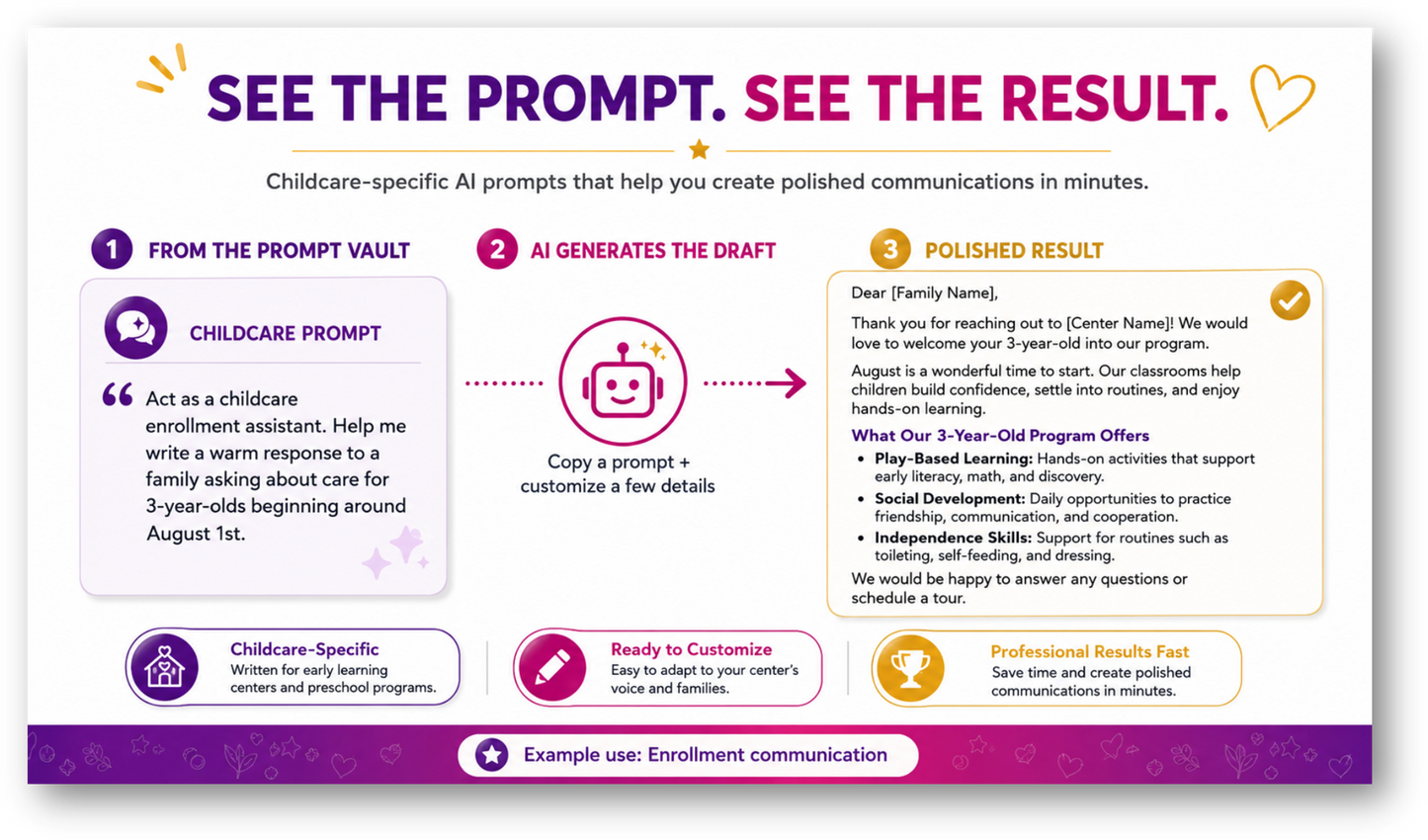
Running a childcare program requires constant communication, planning, problem-solving, documentation, and decision-making. The Childcare AI Business Assistant Vault gives you a practical starting point for those everyday tasks—so you can spend less time staring at a blank screen and more time leading your program.
Inside the Vault, you will find more than 1,000 thoughtfully written prompts designed to help childcare professionals communicate more clearly, organize operations, support employees, engage families, create classroom resources, strengthen compliance practices, and grow their businesses.
The prompts are written in plain language and are easy to copy, customize, and use—even for someone who is completely new to AI.
What Makes This Vault Different?
This is not a generic collection of business prompts.
Every prompt was developed with the needs of childcare and preschool programs in mind. The Vault includes prompts for both administrative and classroom responsibilities, with built-in placeholders and guidance to help users create more relevant, professional, and useful AI-generated results.
The Vault can help you:
- Draft family and employee communications
- Create policies, procedures, and staff resources
- Prepare for licensing and compliance reviews
- Plan lessons and classroom activities
- Improve enrollment and marketing efforts
- Organize director and leadership responsibilities
- Develop staff training and coaching materials
- Review data and create improvement plans
- Generate social media and recruitment content
- Save time on routine writing and planning tasks
- Improve consistency across your program
- Use AI more responsibly in a childcare setting
What Is Included
1. Searchable Prompt Vault Excel Workbook
The primary workbook includes more than 1,000 ready-to-use prompts in one organized Prompt Library.
Users can search and narrow the library by:
- Keyword
- Business category
- Output type
Each prompt record includes:
- Prompt title
- Category and subcategory
- Recommended user or role
- Output type
- Search keywords
- Ready-to-use prompt
- Customization or safety guidance
Microsoft 365 Requirement
The workbook’s interactive search feature uses modern Excel functions and requires
Microsoft 365.
Users without Microsoft 365 can still access the prompts through the additional category-based workbook included with the bundle.
2. Category-by-Category Prompt Library Workbook
A second Excel workbook is included for users who prefer a more traditional browsing method or who are unable to use the Microsoft 365 search feature.
This version includes a separate worksheet for each major business category, making it easy to:
- Browse prompts by topic
- Locate prompts without using the search tool
- Copy prompts directly from the appropriate category tab
- Review all prompts within a particular area of operation
This alternative ensures that every purchaser can access the complete Prompt Vault, regardless of which search method they prefer.
3. Prompt Vault User Guide
The polished user guide introduces the Vault and shows users how to get better results from AI.
The guide includes:
- How to navigate and search the workbook
- How to select and copy a prompt
- How to replace placeholders with center-specific details
- How to provide useful context to an AI tool
- How to refine an AI response
- Tips for improving tone, format, and accuracy
- Examples of stronger and weaker AI requests
- Guidance for reviewing AI-generated content
- Confidentiality and responsible-use reminders
- Troubleshooting tips for common issues
The guide was designed for childcare professionals with all levels of AI experience.
4. Editable AI Use and Confidentiality Policy Template
Because childcare programs handle sensitive information about children, families, and employees, the bundle also includes an editable AI Use and Confidentiality Policy Template.
The template helps owners and directors establish center-specific expectations for:
- Approved and prohibited uses of AI
- Protection of confidential information
- Use of placeholders and de-identified information
- Approved AI platforms and accounts
- Human review of AI-generated content
- Medical, legal, employment, and licensing limitations
- Staff responsibilities
- Reporting privacy or security concerns
- Policy violations and corrective action
- Training and acknowledgment requirements
The document can be customized to match the center’s existing confidentiality, technology, personnel, and operational policies.
5. Employee AI Policy Acknowledgment Form
The editable acknowledgment form allows childcare programs to document that employees have received, reviewed, and agreed to follow the center’s AI Use and Confidentiality Policy.
It includes:
- Employee and center information
- AI-use expectations
- Confidentiality responsibilities
- Human-review requirements
- Prohibited information and activities
- Employee signature and date
- Supervisor or center representative verification
Key Benefits
- Created specifically for childcare and preschool businesses
- Includes more than 1,000 practical prompts
- Covers both administrative and classroom responsibilities
- Organized by business function, task, and output type
- Easy to copy, customize, and use
- Designed for new and experienced AI users
- Reduces blank-screen stress
- Saves time on routine writing and planning
- Helps improve consistency and professionalism
- Includes privacy and confidentiality guidance
- Offers both searchable and category-based access
- Can be expanded with future prompt collections and updates
Who Is This Bundle For?
The Childcare AI Business Assistant Vault is ideal for:
- Childcare center owners
- Preschool owners
- Center directors
- Assistant directors
- Multi-site leaders
- Administrative staff
- Enrollment coordinators
- Human resources staff
- Curriculum coordinators
- Lead teachers
- Family engagement staff
- Marketing and social media staff
- Consultants supporting early childhood programs
- New childcare business owners building operational systems
Prompt Vault Categories
Director Operations — 80 Prompts
Supports the daily administrative and operational responsibilities of childcare directors.
Topics include:
- Daily director routines
- Opening and closing
- Staffing and classroom coverage
- Scheduling
- Ratios and supervision
- Delegation
- Administrative organization
- Supply management
- Facility operations
- Meals and food service
- Transportation
- Emergency coordination
- Meetings
- Events
- Time management
- Multi-site communication
Enrollment — 65 Prompts
Helps programs respond to prospective families, manage enrollment, and support families from inquiry through withdrawal.
Topics include:
- Inquiry responses
- Tours
- Waitlists
- Enrollment follow-up
- Registration
- Family onboarding
- Classroom transitions
- Re-enrollment
- Withdrawal
- Enrollment forecasting
- Conversion tracking
- Enrollment events
- Family needs assessments
Finance & Tuition — 55 Prompts
Supports tuition communication, financial planning, budgeting, and routine financial review.
Topics include:
- Annual budgeting
- Tuition rates
- Tuition increases
- Payment reminders
- Past-due balances
- Late fees
- Expense reviews
- Payroll planning
- Break-even analysis
- Cash-flow planning
- Vendor costs
- Scholarships
- Discounts
- Financial reporting
Grants & Fundraising — 45 Prompts
Helps programs develop grant content, fundraising materials, and community-support campaigns.
Topics include:
- Grant concepts
- Needs statements
- Goals and objectives
- Project summaries
- Grant budgets
- Evaluation plans
- Sustainability
- Letters of support
- Donor communication
- Fundraising campaigns
- Sponsorships
- Community partnerships
- Grant reporting
Human Resources — 75 Prompts
Supports childcare hiring, onboarding, employee records, performance management, and separation processes.
Topics include:
- Job descriptions
- Recruitment
- Applicant screening
- Interviewing
- Reference checks
- Offer letters
- Rejection messages
- New-hire documentation
- Onboarding
- Employee files
- Attendance
- Leave communication
- Performance reviews
- Compensation discussions
- Separation
- Exit interviews
Lesson Planning — 95 Prompts
Provides ready-to-customize ideas for developmentally appropriate learning experiences across age groups.
Topics include:
- Infant activities
- Toddler activities
- Preschool activities
- Pre-K activities
- School-age activities
- Weekly themes
- Literacy
- Math
- Science
- Art
- Music and movement
- Sensory learning
- Outdoor play
- Social-emotional learning
- Fine-motor development
- Gross-motor development
- Classroom centers
- Transitions
- Inclusive adaptations
- Family extension activities
Licensing & Compliance
Supports compliance organization, documentation reviews, inspection preparation, and corrective action.
Topics include:
- Inspection preparation
- Staff-file audits
- Child-file audits
- Ratios
- Training records
- Background clearances
- Health documentation
- Medication records
- Emergency drills
- Transportation records
- Required postings
- Corrective action plans
- Compliance calendars
- Regulation review
- Evidence organization
Marketing — 60 Prompts
Helps childcare programs promote enrollment, communicate their value, and strengthen community visibility.
Topics include:
- Marketing plans
- Enrollment campaigns
- Open houses
- Tours
- Website content
- Flyers
- Brochures
- Program descriptions
- Recruitment marketing
- Referral programs
- Community outreach
- Partnerships
- Testimonials
- Seasonal promotions
- Brand messaging
Owners & Leadership — 55 Prompts
Supports strategic thinking, leadership communication, business growth, and long-term planning.
Topics include:
- Strategic planning
- Annual priorities
- Mission and values
- Business growth
- Expansion
- New-center planning
- Multi-site leadership
- Owner-director communication
- Decision-making
- Risk management
- Vendor evaluation
- Succession planning
- Business continuity
- Leadership development
Parent Communication — 90 Prompts
Provides practical starting points for everyday family communication—from positive updates to difficult conversations.
Topics include:
- Welcome messages
- Daily reminders
- Tuition communication
- Illness notices
- Incident follow-up
- Behavior concerns
- Positive child updates
- Supply reminders
- Late pickup
- Absence follow-up
- Classroom transitions
- Policy reminders
- Weather closures
- Events
- Surveys
- Difficult conversations
- Family education
- Program changes
- Emergency communication
Policies & Procedures — 75 Prompts
Helps programs create, review, summarize, and communicate operational policies and standard procedures.
Topics include:
- Policy drafting
- SOP creation
- Policy summaries
- Employee handbook content
- Family handbook content
- Supervision
- Child release
- Attendance
- Tuition
- Medication
- Illness
- Incident reporting
- Emergency response
- Transportation
- Cleaning and sanitation
- Confidentiality
- Social media
- Technology and AI
- Policy acknowledgments
- Process reviews
Quality Improvement — 60 Prompts
Supports program evaluation, data review, goal setting, and continuous quality improvement.
Topics include:
- Improvement plans
- Family surveys
- Staff surveys
- Classroom observations
- Enrollment analysis
- Retention analysis
- Turnover analysis
- Program assessments
- Process improvement
- Goal setting
- Data review
- Quality-rating preparation
- Annual reports
- Action tracking
Social Media — 60 Prompts
Provides childcare-specific ideas for building a consistent, engaging social media presence.
Topics include:
- Content calendars
- Enrollment posts
- Hiring posts
- Staff spotlights
- Classroom learning posts
- Family tips
- Seasonal posts
- Community events
- Safety education
- Video scripts
- Reels
- Captions
- Calls to action
- Hashtags
- Photo ideas
Staff Management — 70 Prompts
Helps directors coach employees, improve communication, address concerns, and strengthen workplace culture.
Topics include:
- Coaching
- Performance concerns
- Recognition
- Accountability
- Conflict resolution
- Attendance concerns
- Team communication
- Staff morale
- Retention
- Burnout prevention
- Delegation
- Meetings
- Workplace culture
- Professional boundaries
- Leadership coaching
Staff Training — 60 Prompts
Helps childcare leaders create structured training materials and follow-up activities.
Topics include:
- Orientation
- Micro-trainings
- Training outlines
- Learning objectives
- Knowledge checks
- Quizzes
- Scenarios
- Role-play
- Handouts
- Competency checklists
- Refresher training
- Training calendars
- Follow-up assessments
- Coaching activities
Important Use Note
The Prompt Vault is designed to assist with brainstorming, drafting, organization, and routine business communication.
AI-generated information should always be reviewed before it is used. Users remain responsible for confirming accuracy and ensuring that content complies with their center’s policies, licensing requirements, employment practices, health and safety guidance, and applicable laws.
Confidential or identifying information about children, families, or employees should not be entered into an AI tool.
Share